Panda Gamepad
Get this app from Google Play Store for automatic updates & security. Use APK if Play Store is unavailable in your region or you need an older version.
Screenshots
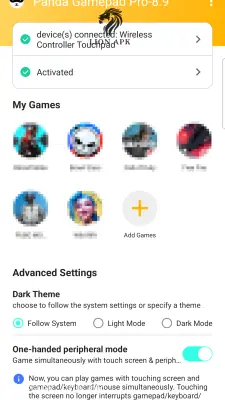
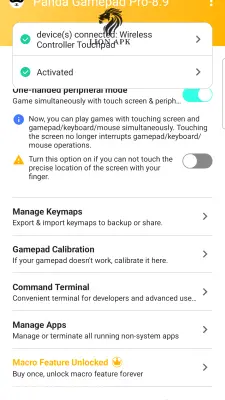
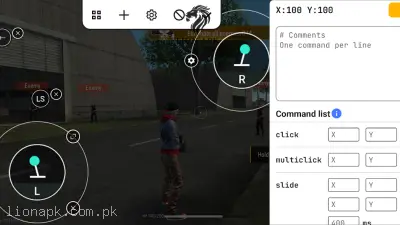
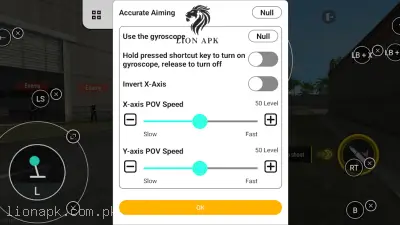
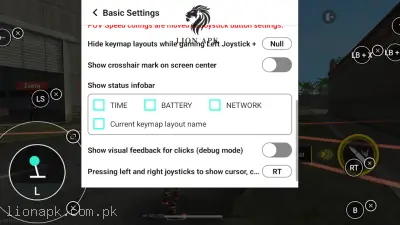
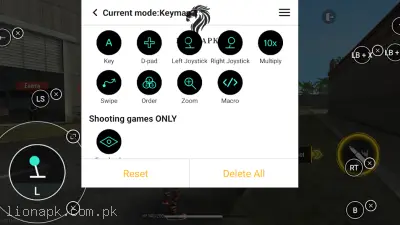

Screenshots from Google Play
More in Tools
View all →



Top Downloads in Tools
See all →



About this app
Panda Gamepad Pro: The Ultimate Keymapper for Mobile Gaming
Are you frustrated by failing difficult boss fights because touchscreen controls are unreliable? Transitioning from a physical console controller to a flat glass screen can completely ruin the immersion for dedicated players. Panda Gamepad Pro is the definitive mobile utility application designed to solve this exact problem. It bridges the gap between touchscreen limitations and physical hardware, giving you true console-level control on your smartphone.
What is the Panda Gamepad Pro App?
Panda Gamepad Pro is a premium keymapping tool built specifically for Android devices. Unlike standard mobile games that might automatically support basic controllers, a vast majority of the most popular titles do not offer native gamepad support. This application acts as an intelligent digital translator. It allows you to connect any standard Bluetooth or wired controller and map its physical buttons, triggers, and joysticks directly to the virtual touch buttons on your screen. This completely transforms your smartphone into a highly precise, portable console.
Why You Need This App Today
In the modern mobile gaming ecosystem, the complexity of games is incredibly high. Suppose you are streaming heavy RPGs like Baldur's Gate to your mobile device, or trying to survive the precise combat encounters in a mobile port of Resident Evil. Relying purely on a flat touchscreen for these massive games is a major disadvantage. Your hands cramp up quickly, your thumbs block your view of incoming enemies, and missing a single digital button during a chaotic fight can ruin hours of progress.
You need this application because it eliminates that physical friction. You can connect an ergonomic physical controller and play for hours without experiencing hand fatigue. The app runs seamlessly in the background, consuming minimal RAM to ensure your device does not lag during intense gaming sessions. It instantly elevates your reaction times, allowing you to experience complex games exactly how they were meant to be played.
Top Features of the Panda Gamepad Pro Application
This application dominates the premium utility category by offering a highly optimized mapping environment. Here are the amazing features you will enjoy:
-
Direct Game Execution: Unlike older mapping apps that force you to create a game "clone" (which often triggers anti-cheat bans), Panda Gamepad Pro runs the original game directly. This makes it incredibly safe for competitive online titles and heavy single-player adventures.
-
Universal Controller Support: You are never restricted to purchasing an expensive brand of hardware. The app easily recognizes and connects with almost any wireless Bluetooth gamepad, including Xbox controllers, PlayStation DualShock, and third-party alternatives.
-
Highly Customizable Interface: You have absolute control over your digital button layout. Simply drag and drop mapping icons anywhere on your screen. You can adjust the exact deadzone and sensitivity of your physical joysticks for perfect camera aiming.
-
Clean and Floating Widget: While playing, a small, transparent panda icon floats unobtrusively on the edge of your screen. To change a button layout or adjust sensitivity, simply tap this widget to open the settings instantly without closing your game.
-
Google Play Login Support: Because the application does not clone your core game files, your Google Play Games account login works flawlessly. You can safely save your progress to the cloud and sync your gaming achievements.
How to Use Panda Gamepad Pro (Step-by-Step)
Setting up your controller requires a brief initial configuration. Follow these steps to start dominating your matches:
-
Install and Connect: Turn on your Bluetooth controller and pair it securely with your mobile phone through the standard Bluetooth settings.
-
Launch the App: Open the app and wait for the main dashboard to display the "Device Connected" indicator.
-
Activate the Service: The app requires a core system activation to bypass Android's touch restrictions. Activate it directly on Android 11+ devices using wireless debugging, or by temporarily connecting your phone to a PC.
-
Add Your Games: Tap the "+" button inside the app to load your favorite installed games into the Panda launcher.
-
Map and Play: Launch the game from inside the Panda app. Tap the floating widget, drag the digital controller icons over your game's virtual buttons, save your layout, and start playing!
Pros and Cons of the App
Pros:
-
Safe, direct-launch technology that rigorously protects your gaming accounts from bans.
-
Works flawlessly with a massive variety of popular Bluetooth and physical controllers.
-
Highly optimized to be lightweight, ensuring it does not drain your mobile battery.
Cons:
-
The initial PC or wireless debugging activation process can be slightly technical.
-
If you restart your mobile phone, the core activation is lost, and you must run the process again.
Conclusion
Panda Gamepad Pro is an absolute necessity for any serious mobile gamer who wants to bypass touchscreen limitations and play like a true professional. It completely bridges the technological gap between casual screen tapping and hardcore console-level precision. You no longer have to suffer from sweaty thumbs or inaccurate button presses during high-stakes matches. Download the safe application today, connect your favorite controller, and experience true mobile gaming supremacy exactly the way it was designed to be enjoyed.