Internet Speed Meter
Get this app from Google Play Store for automatic updates & security. Use APK if Play Store is unavailable in your region or you need an older version.
Screenshots
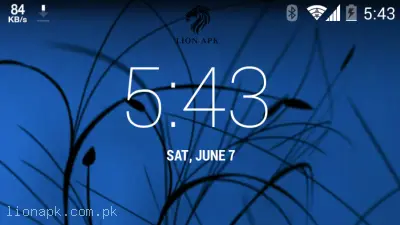
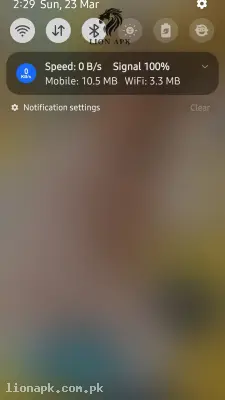
Screenshots from Google Play
More in Tools
View all →



Top Downloads in Tools
See all →



About this app
When you are managing heavy digital tasks, downloading modified applications, or just trying to stream a tutorial video, sudden network drops are incredibly frustrating. You might think your smartphone is freezing up, but often it is just the internet connection secretly dying in the background. If you are doing heavy digital work on a budget-friendly device like an Infinix Hot 40i and constantly managing limited monthly mobile data packages, you need a way to see exactly what your network is doing in real-time. Internet Speed Meter Lite completely solves this problem by putting a live, accurate network monitor right on your screen.
Quick Answer: What is the Internet Speed Meter Lite App?
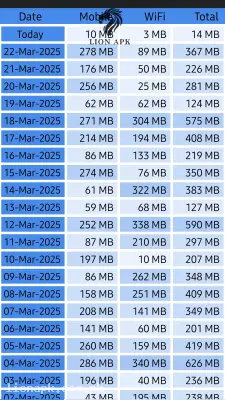
Internet Speed Meter Lite is a highly efficient, lightweight system utility application. It displays your real-time internet downloading and uploading speed directly in your phone's top status bar. Additionally, it features a smart daily data monitor that tracks exactly how many megabytes or gigabytes of Wi-Fi and mobile data you consume every single day, keeping a clean 30-day log so you never accidentally exceed your network package limits.
Why You Need This App Today
In our fast-paced daily routines, keeping track of background data usage is a constant struggle. If your daily workflow involves managing the backend of platforms like lionapk.com.pk, you are constantly uploading and downloading heavy APK files. You need this application because it acts as an instant diagnostic tool. By just glancing at the top of your screen, you can instantly tell if a file upload has frozen or if your connection is actually transferring data.
Furthermore, if you act as the family tech expert, this tool is perfect for monitoring devices. It helps you quickly spot if an application is secretly draining expensive mobile data in the background. It is an absolute daily necessity that instantly removes the guesswork from your internet connection, keeping you in total control of your digital workspace and your monthly data budget.
Top Features of the Internet Speed Meter Lite Application
This application completely dominates the system utility category because it provides essential network data without draining your battery. Here are the amazing features you will enjoy:
-
Live Status Bar Monitor: A clean, unobtrusive number sits perfectly at the top of your screen, showing your exact internet speed down to the kilobyte, updating every single second.
-
Smart Notification Panel: When you pull down your phone's notification shade, the app displays a clean summary of your daily data usage, separating exactly how much Wi-Fi and mobile data you have used today.
-
30-Day Data History: The app acts as an automatic digital logbook. You can open it to view a complete 30-day calendar showing your daily data consumption, making it incredibly easy to track your monthly internet habits.
-
Zero Battery Drain: Unlike heavy monitoring apps that constantly wake up your processor, this utility is highly optimized. It goes to sleep when your screen turns off, meaning it consumes almost zero battery life.
-
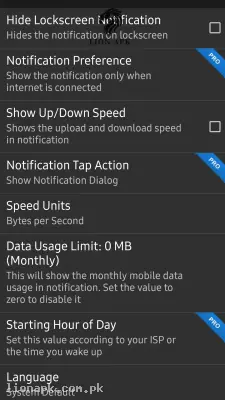
Highly Customizable UI: You can easily change the color of the status bar text or choose to hide the meter when you are completely disconnected from the internet to keep your screen clean.
How to Use Internet Speed Meter Lite (Step-by-Step)
Taking control of your internet data takes less than thirty seconds. Follow these simple steps to activate your live monitor:
-
Install the Application: After downloading the app, launch it directly from your mobile home screen.
-
Grant Notification Access: On modern Android devices, the app will politely ask for permission to display notifications. Tap "Allow" so the meter can appear in your status bar.
-
Check the Status Bar: Look at the top right or top left of your screen (depending on your phone model). You will immediately see a small number displaying your current speed (e.g., "0 KB/s").
-
Open a Browser: To test it out, open your web browser or start downloading a file. Watch the live meter instantly shoot up to show your exact transfer speed!
-
View the Logs: Whenever you want to check your daily usage, simply tap the notification or open the app from your home screen to see your complete data history calendar.
Pros and Cons of the App
Pros:
-
Incredibly lightweight and requires almost zero system RAM, making it perfect for budget smartphones.
-
Provides a highly accurate distinction between Wi-Fi and mobile network data consumption.
-
The completely ad-free notification panel provides essential information at a single glance.
-
Does not require complex setups or root access to function perfectly.
Cons:
-
The main dashboard interface looks very basic and has not been visually updated in years.
-
The free version lacks the advanced feature to block specific applications from using the internet (which is locked behind a separate firewall app).
Conclusion
Internet Speed Meter Lite is an absolute necessity for anyone who wants to monitor their network health and prevent unexpected data charges. It completely changes how you interact with your smartphone by making invisible internet traffic visible. You no longer have to wonder why a video is buffering or worry about a background app secretly draining your limited mobile data package. Download the safe application today, activate your live status bar monitor, and take permanent control of your digital network!