AppLock
Get this app from Google Play Store for automatic updates & security. Use APK if Play Store is unavailable in your region or you need an older version.
Screenshots
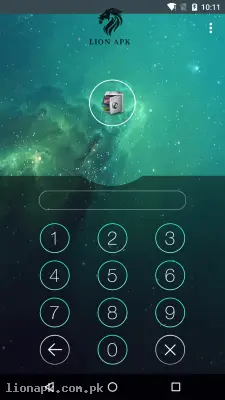
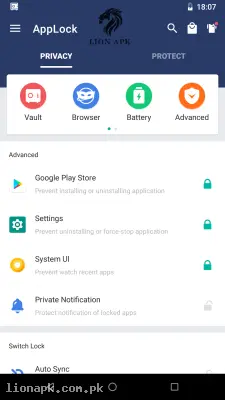

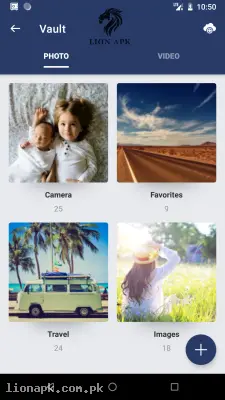
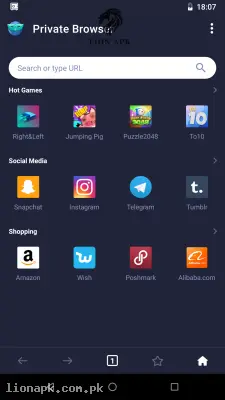
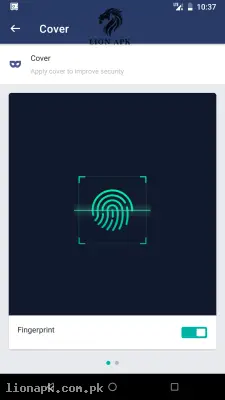
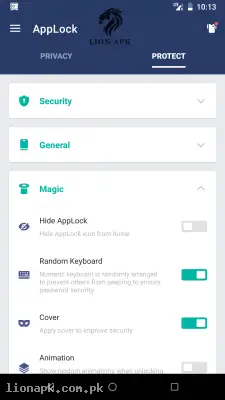
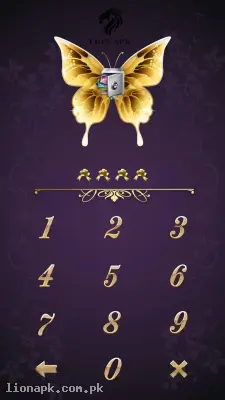
Screenshots from Google Play
More in Tools
View all →



Top Downloads in Tools
See all →




About this app
AppLock: Secure Your Mobile Privacy and Hide Your Personal Data
Do you feel nervous when a friend or a family member asks for your mobile phone to make a quick call? We all have personal WhatsApp chats, private family photos, and important financial applications that we do not want anyone else to open. AppLock is the perfect security application that acts as a strong digital guard for your mobile phone. Let us see why this app is an absolute necessity for protecting your privacy.
What is the AppLock App?
AppLock is a highly popular and trusted mobile security application. While your phone has a main screen lock, what happens when you unlock it and hand it to someone else? They can open any application they want. AppLock solves this by allowing you to put a specific password, pattern, or fingerprint lock on individual applications.
If you lock your WhatsApp, Gallery, or Facebook using this app, nobody can open them even if your main mobile screen is completely unlocked. It provides a double layer of strong security, ensuring that your private digital life remains totally private and safe from nosy friends or accidental clicks by children.
Why You Need This App Today
In our local culture, sharing mobile phones is very common. Your younger siblings might take your mobile to play games like Ludo King or Free Fire, or a colleague at the office might borrow your phone to check a document. While they are using it, they could easily open your personal messages, scroll through your photo gallery, or accidentally open your mobile banking or digital wallet apps.
This creates a lot of daily stress. You cannot always say "no" when someone asks for your phone, but you also want to protect your privacy. AppLock completely removes this daily tension. You can confidently hand over your phone to anyone. If they try to open your locked apps, a password screen will immediately block them. It is a daily utility that gives you complete peace of mind and keeps your personal secrets entirely safe.
Top Features of the AppLock Application
This application is dominating the security category because it provides powerful, easy-to-use privacy tools. Here are the top features you will enjoy when you download the AppLock APK:
Lock Any Application Instantly. You have total control over your phone. You can lock your social media apps (Facebook, Instagram, Snapchat), communication tools (WhatsApp, Messenger), and system apps like your Contacts, SMS, and Settings. You decide exactly what stays open and what stays locked.
Secure Photo and Video Vault.t Just like locking apps, you can also hide your personal pictures and videos. AppLock has a secret digital vault. When you move photos from your main gallery into this vault, they completely disappear from the phone. They can only be viewed inside the AppLock app after entering your secret password.
Intruder Selfie Feature: re This is an amazing security tool. If someone takes your phone behind your back and tries to guess your password to open your WhatsApp, the application will secretly take a photo of their face using the front camera. You can later check the app to see exactly who was trying to spy on you.
Multiple Lock Types: You do not have to rely on just one type of lock. You can choose a classic number PIN, draw a secret pattern, or use your mobile phone's built-in fingerprint scanner for incredibly fast and smooth unlocking.
Invisible Pattern and Random Keyboard. If someone is standing right next to you and watching your screen, they cannot steal your password. The app allows you to make your drawn pattern completely invisible. It also has a random keyboard feature where the numbers change their position every time, so nobody can guess your PIN by looking at your finger movements.
Fake Cover Loc:k To trick spying friends, you can enable a fake cover. Instead of showing a password screen, the app will show a fake "App has stopped working" error message. Only you will know the secret trick to bypass this fake error and open the app.
How to Use AppLock (Step-by-Step Guide)
Setting up your mobile security is incredibly simple and takes only two minutes. Just follow these easy steps to lock your first application:
-
Open the Application: After you install the app, launch it on your mobile phone screen.
-
Set Your Master Password: The app will ask you to draw a strong pattern or enter a number PIN. This will be your master key, so do not forget it.
-
Grant Necessary Permissions: The application needs your permission to draw over other apps and access usage data. This is 100% normal and required for the locks to function properly. Tap "Allow".
-
Select Apps to Lock: You will see a list of all the applications installed on your mobile phone. Simply tap the little lock icon next to the apps you want to secure (like WhatsApp or Gallery).
-
Set Up the Vault (Optional): Go to the "Vault" tab inside the app to select and hide your private photos and videos safely.
Why Download AppLock APK from lionapk.com.pk?
Downloading security applications from random internet websites can be very dangerous. You might accidentally install a fake app that steals your data instead of protecting it. By downloading the AppLock APK from our website, lionapk.com.pk, you get a completely genuine, safe, and virus-free file. We provide extremely fast and direct download links without any confusing advertisement pages. We always ensure you receive the latest updated version of the app, giving you the fastest fingerprint unlocking speed and the most reliable privacy protection without any technical errors.
Pros and Cons of the App
Pros:
-
Provides a very strong double-layer security for all your personal applications.
-
The hidden Vault feature is excellent for keeping your family photos completely private.
-
The Intruder Selfie instantly catches anyone trying to spy on your phone.
-
Works very smoothly on budget mobile phones without slowing down the system.
Cons:
-
If you forget your master password and do not set a recovery email, unlocking your phone can be difficult.
-
The free version of the application displays pop-up advertisements when you open the main settings.
Conclusion
AppLock is an absolute necessity for every single mobile phone user who cares about their personal privacy. It completely transforms your smartphone into a highly secure digital safe. You no longer have to worry about siblings, friends, or colleagues accidentally seeing your private chats or personal photos. Whether you want to lock your mobile banking apps for financial safety or hide your gallery for personal peace of mind, this application does the job perfectly. Download the safe application today, set your secret password, and take full control of your mobile privacy.