Screen Lock
Get this app from Google Play Store for automatic updates & security. Use APK if Play Store is unavailable in your region or you need an older version.
Screenshots
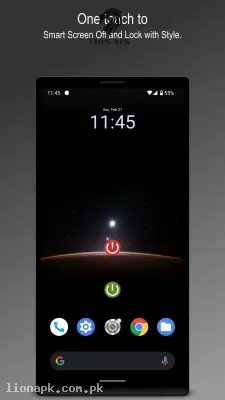
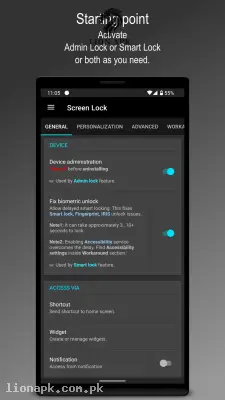
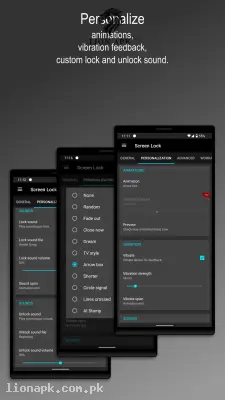
Screenshots from Google Play
More in Tools
View all →



Top Downloads in Tools
See all →



About this app
Screen Lock: Save Your Power Button with Smart Display Controls
Are you constantly pressing your phone's physical power button just to check the time or turn off the screen? Over time, that tiny mechanical button takes a massive beating and is usually the first hardware piece to break on any smartphone. Screen Lock by Icemountain Labs is the ultimate system utility designed to completely protect your device's physical buttons.
What is the Screen Lock App?
Screen Lock is a highly optimized, lightweight Android application that allows you to lock your device and turn off the display without ever touching the physical power button. It creates smart digital shortcuts on your screen and utilizes your phone's built-in hardware sensors to handle the screen timeout automatically. By securely using Device Administrator permissions or Accessibility services, the app instantly puts your phone to sleep just as if you had pressed the hardware button yourself. It acts as a permanent digital replacement for your mechanical hardware.
Why You Need This App Today
In our daily routines, we unlock and lock our smartphones hundreds of times a day. When you are managing an active digital platform like lionapk.com.pk, you are constantly turning your screen on and off to test new applications, reply to user comments, and check your server status. If you or your cousin is doing this heavy administrative work on a budget-friendly device like an Infinix Hot 40i, the mechanical power button takes a massive beating and can quickly become loose or unresponsive due to heavy daily friction.
Repairing a broken power button requires opening up the entire phone framework, which is expensive and highly risky. You need this application because it serves as the ultimate hardware protector. Instead of mechanically grinding down your physical buttons, you can lock your screen instantly with a simple digital tap or a quick physical hand gesture. It is an absolute daily necessity that protects your device's physical lifespan, makes locking your phone faster, and adds beautiful visual flair to an otherwise boring system action.
Top Features of the Screen Lock Application
This application completely dominates the system utility category by offering unparalleled convenience and stunning visual customization. Here are the amazing features you will enjoy:
-
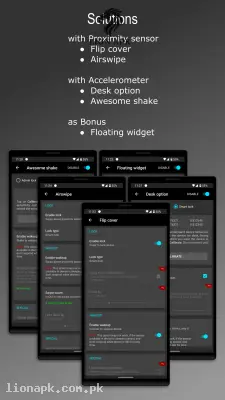
Multiple Locking Shortcuts: You do not just get one digital button. The app allows you to lock your phone using a simple home screen widget, a notification bar button, or an interactive floating icon that stays cleanly on the edge of your screen.
-
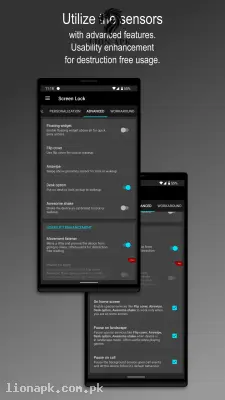
Smart Sensor Controls: The app uses your phone's physical sensors for hands-free locking. You can lock or wake the device using a "Flip Cover" sensor, an "Air Swipe" over the front camera, a "Desk" mode when you put the phone down, or an "Awesome Shake" gesture.
-
Beautiful Screen Off Animations: Turning off your screen does not have to be boring. The app features highly premium transition animations, including the famous retro "Old TV" screen-collapse effect, giving your phone a premium cinematic feel.
-
Extensive Audio Customization: You can easily change the system lock and unlock sounds. Instead of the boring default Android click, you can pick custom tones, adjust their specific volume separately from your ringtone, and even add custom vibration feedback.
-
Distraction-Free Modes: The application is incredibly smart. It features a "Movement Listener" for a distraction-free reading mode, a "Pause on Landscape" setting so you do not accidentally lock the screen while playing games, and a "Pause on Call" mode so it never interferes with your phone conversations.
How to Use Screen Lock (Step-by-Step)
Setting up your digital lock button takes only a few seconds. Follow these simple steps to protect your hardware immediately:
-
Install the Application: After you download the app, launch it directly from your mobile home screen.
-
Grant Necessary Permissions: The app will securely ask for "Device Administrator" permissions (to instantly lock the screen) or "Accessibility Service" (for Android 9+ devices to bypass smart lock delays). Tap "Allow" or "Activate."
-
Choose Your Locking Method: Open the main app settings and select exactly how you want to lock the screen. You can enable the floating widget, the notification bar icon, or place a simple shortcut directly on your home screen.
-
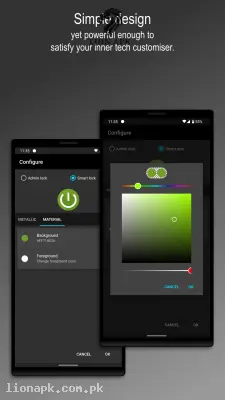
Customize Visuals and Audio: Scroll down to the personalization menu to select your favorite "Screen Off" animation, choose your custom lock icon style (Metallic or Material), and set your favorite locking sound.
-
Tap to Lock: Go back to your home screen, tap your newly created digital lock icon, and watch your screen beautifully turn off without ever touching the hardware button!
Pros and Cons of the App
Pros:
-
Drastically extends the lifespan of your physical power button and side fingerprint scanner.
-
Offers incredibly beautiful, premium animations like the classic Old TV effect.
-
Smart sensor gestures make locking and waking your phone completely hands-free.
-
Highly customizable, allowing you to easily change icons, sounds, and vibration intensity.
Cons:
-
Setting up the required Device Administrator or Accessibility permissions can be slightly confusing for complete beginners.
-
To permanently uninstall the app, you must first remember to manually deactivate the Device Administrator permission in your phone's security settings.
Conclusion
Screen Lock is an absolute necessity for anyone who wants to protect their smartphone's physical hardware from wearing out prematurely. It completely changes how you interact with your device by replacing harsh physical button presses with smooth, elegant digital taps and smart sensor gestures. You no longer have to worry about your power button breaking or becoming unresponsive after months of heavy use. Download the safe application today, set up your smart gestures, and give your physical phone buttons a much-needed permanent vacation!