Xender
Get this app from Google Play Store for automatic updates & security. Use APK if Play Store is unavailable in your region or you need an older version.
Screenshots
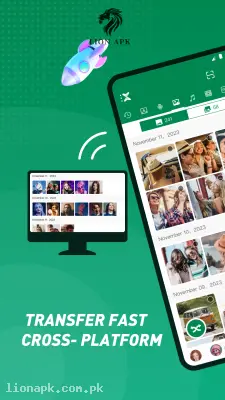
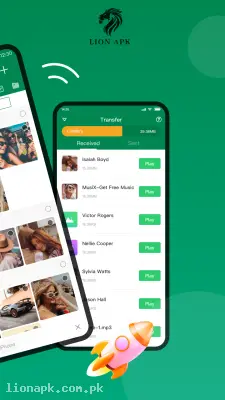
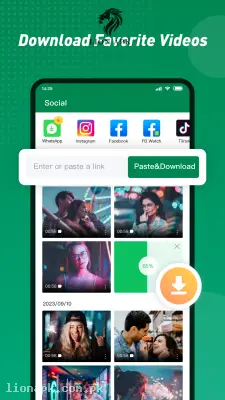

Screenshots from Google Play
More in Tools
View all →



Top Downloads in Tools
See all →



About this app
Xender: The Fastest Way to Share Heavy Files Without Internet
Are you tired of waiting hours for a single video to send over Bluetooth? Do you get frustrated when you want to share a massive mobile game with a friend, but neither of you wants to waste your expensive mobile data packages? Xender is the ultimate digital utility application that completely revolutionizes how we share media. It acts as a blazing-fast, invisible bridge between devices, allowing you to transfer anything in seconds.
What is the Xender App?
Xender is a highly powerful, cross-platform file transfer and sharing application. Instead of relying on a slow Bluetooth connection or requiring an active Wi-Fi network, this app uses the built-in Wi-Fi hotspot technology of your smartphone to create its own secure, localized network. By connecting two or more devices to this invisible network, you can send heavy documents, thousands of photos, high-definition movies, and even fully installed applications from one phone to another at speeds up to 200 times faster than traditional Bluetooth.
Why You Need This App Today
In our highly connected digital routines, transferring massive amounts of data is a daily necessity. Suppose you are managing a platform that constantly updates trending applications, and you need to quickly move heavy APK bundles from your main workstation directly to a testing smartphone. Doing this via a computer cable every single time is incredibly tedious.
Furthermore, if you are hanging out with your cousin and want to send him a massive, 2GB action game so he can play it on his Infinix Hot 40i, doing so over a local 4G network will instantly drain both of your data limits. You need this application because it completely removes the internet from the equation. It allows you to share massive files locally without spending a single rupee on data. It is an absolute daily necessity that saves your time, protects your mobile data, and ensures you can always share your favorite digital content instantly, no matter where you are.
Top Features of the Xender Application
This application completely dominates the file-sharing category because it provides premium transfer speeds and incredibly smart media tools. Here are the amazing features you will enjoy:
-
Blazing Fast Speeds: This is the core magic of the app. It can transfer files at speeds reaching up to 40 Megabytes per second. You can successfully send a full, two-hour HD movie to your friend's phone in less than three minutes.
-
Zero Data Usage: The application does not require a SIM card, an active internet connection, or mobile data. It creates its own secure, offline hotspot, meaning all your file transfers are 100% free of network charges.
-
Universal Format Support: You are not limited to just pictures. The app allows you to share Word documents, massive ZIP folders, raw OBB game data files, and even extract and share the fully installed APKs right off your home screen.
-
Smart Phone Replication: If you recently bought a new smartphone, the app features a brilliant "Phone Copy" tool. With just one tap, it seamlessly imports all your contacts, SMS messages, pictures, and apps from your old phone to your new one.
-
Built-in Media Player: You do not need to exit the app to check what you just received. It includes a built-in file manager and media player so you can instantly listen to the MP3s or watch the videos your friend just sent you.
How to Use Xender (Step-by-Step)
Sharing your first massive file is incredibly fast and intuitive. Just follow these simple steps to connect and transfer:
-
Open the Application: Both you and your friend need to launch the app on your mobile screens.
-
Select Send or Receive: On the sending phone, tap the prominent "Send" button. On the receiving phone, tap the "Receive" button.
-
Grant System Permissions: The app will ask for Location and Wi-Fi permissions to successfully create the local hotspot. Tap "Allow" on both devices.
-
Connect the Devices: The sending phone will display a radar screen. Tap on your friend's device avatar when it pops up, or quickly scan the QR code displayed on their screen.
-
Select and Share: Once connected, simply tap on any videos, apps, or folders you want to share and hit "Send." Watch the progress bar shoot to 100% in seconds!
Pros and Cons of the App
Pros:
-
Incredibly fast transfer technology that completely outperforms Bluetooth and NFC.
-
100% offline sharing protects your expensive monthly mobile data packages.
-
Cross-platform support means you can easily send files from an Android device directly to an iOS device or a PC.
-
The Phone Copy feature is an absolute lifesaver when upgrading your device.
Cons:
-
The user interface has become slightly cluttered over the years with unnecessary mini-games and social feeds.
-
The free version of the application displays pop-up video advertisements right after you finish a file transfer.
Conclusion
Xender is an absolute necessity for anyone who frequently shares digital media, games, or applications. It completely changes how you manage your files by giving you the power to move massive amounts of data instantly without relying on internet providers. You no longer have to suffer through slow Bluetooth transfers or worry about exhausting your data limit just to share a funny video. Download the safe application today, connect with your friends, and experience the ultimate speed of offline file sharing!