SWAP
Get this app from Google Play Store for automatic updates & security. Use APK if Play Store is unavailable in your region or you need an older version.
Screenshots
Screenshots from Google Play
More in Tools
View all →



Top Downloads in Tools
See all →





About this app
SWAP - No ROOT: Give Your Smartphone a Massive Memory Boost
Are you tired of your smartphone completely freezing right in the middle of an important task? Do your background applications constantly close or refresh because your device has run out of memory? Buying a brand-new, expensive flagship phone just to get more RAM is not always an immediate or practical option. SWAP - No ROOT is a highly innovative utility application that artificially expands your mobile RAM, giving you a significantly smoother, faster, and much more stable digital experience.
What is the SWAP - No ROOT App?
SWAP - No ROOT is a highly powerful Android system optimization tool that changes how your device handles memory. In the traditional computer world, "swap" refers to a technical process where the operating system borrows space from the storage drive to use as virtual memory. This application allows you to take a specific, dedicated portion of your internal mobile storage and convert it directly into a functional SWAP file.
When your actual physical hardware RAM gets full, your Android device can seamlessly and temporarily push inactive background apps into this virtual SWAP file. This process instantly frees up your main hardware RAM for the heavy application currently running on your screen, preventing unexpected crashes and extreme lag without requiring you to "root" or void your phone's official warranty.
Why You Need This App Today
Mobile applications, modern websites, and social media platforms are becoming heavier and more demanding every single day. If you are managing the daily backend of a growing digital platform like lionapk.com.pk, you likely have dozens of mobile browser tabs open simultaneously. Suppose you are switching back and forth between writing a detailed tech article, downloading files, and replying to users. If you are doing all of this on a budget-friendly device, a lack of RAM means your browser will constantly refresh when you switch tabs, causing you to lose your unsaved data and wasting your valuable time.
Furthermore, if you are a hardcore gamer looking up complex strategies for massive titles like Baldur's Gate 3 or Resident Evil, you need your heavy game to stay open and paused in the background while you read a text guide. You need this application because it serves as an instant digital safety net. It allows your device to punch well above its hardware class, handling intense multitasking efficiently. It is an absolutely mandatory utility for anyone who wants peak performance and ultimate stability from their current smartphone.
Top Features of the SWAP - No ROOT Application
This application completely dominates the system utility category by bringing advanced, PC-level memory management directly to standard phones. Here are the amazing features you will enjoy:
-
No Root Access Required: The biggest advantage is exactly what the name implies. Creating virtual memory on Android used to require highly technical "rooting" that could easily damage the phone or void its warranty. This app uses entirely safe, standard system permissions to achieve the same result.
-
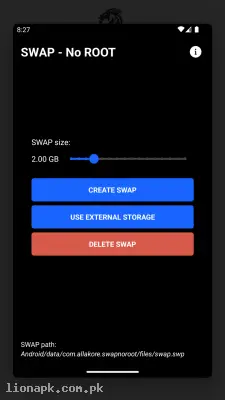
Custom VRAM Allocation: You have complete, 100% control over how much storage space you want to convert. You can quickly allocate a small 500MB swap file for everyday web browsing, or create a massive 2GB file for intense, heavy multitasking and long gaming sessions.
-
Instant Background Stability: By continuously moving idle applications into the virtual memory file, the app ensures your minimized tasks stay alive much longer. You can easily switch between a heavy mobile game and a messaging app without the game constantly restarting from the main loading menu.
-
Simple, User-Friendly Interface: You do not need any coding knowledge or technical background to use this tool. The interface is incredibly clean, featuring a simple slider to select your desired memory size and a single button to create the file instantly.
-
Easy One-Tap Reversal: If you ever need your internal storage space back to download a heavy movie or take new photos, simply open the app and tap "Delete SWAP." The virtual memory is instantly cleared, returning your storage space to normal in seconds.
How to Use SWAP - No ROOT (Step-by-Step)
Creating your very first virtual memory file takes less than two minutes. Follow these simple steps to boost your phone:
-
Open the Application: After you install the app, launch it on your mobile home screen.
-
Grant Storage Permissions: The app will politely ask for permission to read and write to your internal storage. Tap "Allow" so it has the necessary access to create the dedicated memory file.
-
Select File Size: Use the simple slider or manually type in the exact amount of MBs (Megabytes) you want to convert into virtual RAM. For example, typing "1024" creates a 1GB memory file.
-
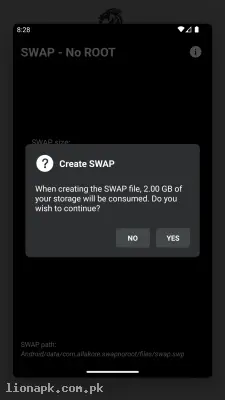
Create the SWAP: Tap the large "Create SWAP" button. The app will immediately begin allocating the storage space. Keep the app open and do not touch your screen during this short background process.
-
Reboot Your Phone: Once the app confirms the file is successfully created, it is highly recommended to restart your mobile phone so the Android system recognizes the new virtual memory pool perfectly.
Pros and Cons of the App
Pros:
-
Instantly improves multitasking stability and stops background applications from force-closing.
-
Completely safe to use since it does not require rooting or altering sensitive core system files.
-
Allows older, budget-friendly smartphones to handle demanding applications incredibly smoothly.
-
Very lightweight application that does not consume massive battery power while running.
Cons:
-
Writing to internal flash storage is slower than physical hardware RAM, so it will not magically speed up a slow CPU processor.
-
Continuous reading and writing to the SWAP file can cause slight extra wear on the phone's internal storage over a long period.
Conclusion
SWAP - No ROOT is an absolute necessity for anyone struggling with a low-memory smartphone or an aging device. It completely transforms how your Android handles multitasking by utilizing your empty storage space to act as a powerful digital buffer. You no longer have to suffer through applications constantly reloading, losing your web browser progress, or experiencing sudden game crashes due to strict memory limits. Download the safe application today, create your custom virtual RAM file, and experience true multitasking freedom without buying a new phone!