Remini - AI Photo Enhancer
Get this app from Google Play Store for automatic updates & security. Use APK if Play Store is unavailable in your region or you need an older version.
Screenshots
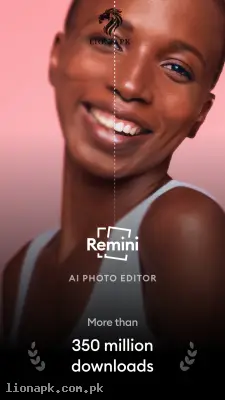
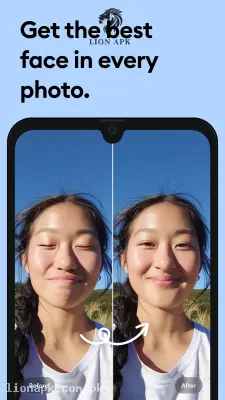
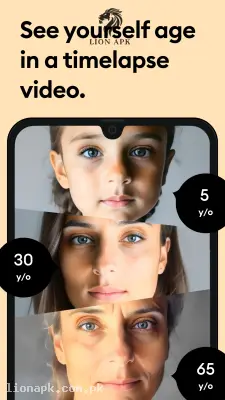



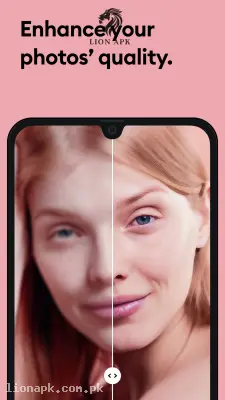
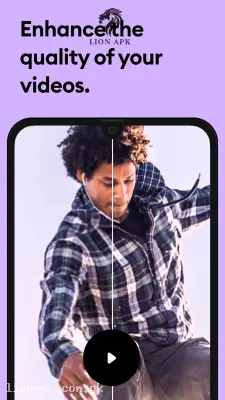
Screenshots from Google Play
More in Photography
View all →




Top Downloads in Photography
See all →About this app
Remini - AI Photo: Make Your Old and Blurry Pictures Crystal Clear
Do you have old, blurry, or low-quality photos that you want to fix quickly? Remini - AI Photo is a very amazing application that uses smart artificial intelligence to make your pictures completely clear in just one second. Let us see how it transforms your mobile photography easily.
What is the Remini App?
Remini is one of the most popular photo editing applications in the world right now. But it is not like a normal photo editor where you have to manually adjust the brightness, contrast, or colors. Instead, it is a one-click magic tool. It uses a highly advanced computer brain to look at your bad, pixelated, or noisy photos and completely rebuilds them to look like high-definition masterpieces.
If you have a picture that was taken ten years ago on a very old mobile phone, Remini will clear the face, sharpen the background, and make it look like it was captured today with a highly expensive digital camera. It does all the hard work automatically, so you do not need any professional editing skills at all.
Why You Need This App Today
We all love capturing memories with our friends and family. However, we do not all have the latest and most expensive smartphones. For example, you might be helping a cousin who uses a budget mobile phone like an Infinix Hot 40i. While it is a great daily phone, the camera can sometimes struggle in low light or capture slightly blurry pictures when your hands are shaking.
This is exactly why you need Remini on your mobile phone. It solves the problem of bad cameras instantly. You do not need to delete a good memory just because the photo came out blurry. You can just put that bad picture into this application, and it will fix the faces, remove the blur, and sharpen the details perfectly. Furthermore, we all have old printed family albums that are getting yellowed and scratched. You can simply take a photo of those old printed pictures with your mobile, and this app will restore them to look fresh and brand new. It is a daily utility that saves your precious memories from being lost or looking bad on social media.
Top Features of Remini AI Photo
This application is dominating the photography category because its artificial intelligence is truly mind-blowing. Here are the top tools you will get when you download the Remini APK:
Instant Photo Enhancement: This is the main magic button of the application. You just select a blurry or low-quality photo, tap the "Enhance" button, and wait for a few seconds. The app will show you a "Before and After" slider. You can slide your finger across the screen to see how the blurry face suddenly becomes completely sharp and clear.
Old Photo Restoration:n If you have black and white photos of your grandparents, this feature is for you. The app can actually remove scratches from old printed photos. It also has an amazing tool that automatically adds beautiful, natural colors to black and white pictures, bringing old family history back to life.
Professional AI Avatar. r.s. Do you need a very professional-looking picture for your office CV or your LinkedIn profile, but you do not want to go to a photo studio? The app can take your casual selfies and use AI to generate highly professional headshots. It changes your clothes into a suit and gives you a perfect studio background.
VideEnhancement.ent In the latest updates, the developers added the ability to fix bad vi,deos too. If you have a short video clip that is dark or blurry, the application applies the same magic frame by frame to make your video crystal clear for your social media uploads.
Face Beautific:ation The AI does not just sharpen the image; it also naturally enhances facial features. It smoothly clears skin textures, sharpens the eyes, and brightens the smile without making the picture look fake or overly edited.
How to Use Remini (Step-by-Step Guide)
Using this smart photo application is incredibly simple. You do not need any editing experience. Just follow these easy steps to fix your first picture:
-
Open the Application: After installing the app, simply launch it on your mobile phone screen.
-
Select Your Photo: The app will ask for permission to open your mobile gallery. Find and select the blurry or old photo that you want to fix.
-
Tap Enhance: On the bottom of the screen, tap the big dark "Enhance" button.
-
Wait a Few Seconds: The artificial intelligence will start working. This usually takes about ten to fifteen seconds, depending on your internet connection speed.
-
Save the Result: A slider will appear on your screen. Swipe left and right to see the magic change. If you are happy with the clear result, tap the download arrow icon at the top right corner to save the new HD photo to your mobile gallery.
Why Download Remini APK from lionapk.com.pk?
Downloading popular photo editing applications from unknown internet websites can be very risky. You might download a fake version that steals your personal photos or fills your mobile with annoying pop-up ads. By downloading the Remini APK from our website, lionapk.com.pk, you get a 100% genuine, safe, and virus-free file. We provide extremely fast and direct download links so you do not have to wait or click on confusing buttons. We always ensure you receive the most updated version here, which means you can enjoy the fastest AI processing and the newest Avatar features without any technical errors.
Pros and Cons of the App
Pros:
-
Instantly fixes blurry, dark, and noisy photos with a single tap.
-
Bring old black and white family pictures back to life by adding natural colors.
-
Very clean and simple design that anyone can use easily without training.
-
Saves you money because you do not need to buy an expensive smartphone camera.
Cons:
-
The free version of the application shows long video advertisements before and after saving a photo.
-
You need a highly stable internet connection because the AI processing happens online, not on your phone.
Conclusion
Remini - AI Photo is an absolute necessity for anyone who loves taking pictures. It completely changes the way you look at mobile photography. You no longer have to worry about shaking your hands or taking photos in bad lighting. Whether you want to clear up a blurry selfie, create a professional profile picture, or save an old family memory, this application provides everything with just one simple click. Download the safe application today and turn your daily mobile photos into clear, high-definition masterpieces.